This Sample Mean Calculator quickly computes the average of your data and shows a clear, step-by-step explanation of how the result is calculated. Simply enter your numbers, and the tool will give you the mean instantly. This makes it easy to understand and verify your calculations.
Calculate the Sample Mean Using this Online Calculator
How to Use the Sample Mean Calculator
Calculating the average of your data has never been easier. However, our Sample Mean Calculator makes it easier for you. It not only gives you accurate result but also breaks down the steps to help you understand how to find the sample mean manually.
Here’s how the calculator works:
- Enter your numbers in the input box. You can separate them with commas, spaces, or even paste directly from Excel.
- Click “Calculate” button to get the sample mean
The calculator will give you the sample mean and provide you with a step-by-step explanation, showing you the sum of all values, the sample size, and the application of sample mean formula.
What is a Sample Mean?
The sample mean, represented by the symbol, x̄, is the average of a set of data points taken from a larger population. It gives you a simple way to summarize your data with a single value. The formula for calculating the sample mean is:
$\bar{x} = \frac{\sum x_i}{n}$
Where:
- xi represents each individual data point
- n is the total number of observations in the sample
- ∑xi is the sum of all data points
Therefore, to calculate the sample mean, you simply need to follow these 3 simple steps:
- Count the number of observations in the dataset. This gives sample size (n).
- Sum all the values in the dataset to get ∑xi
- Divide the sum all the values (∑xi) by the sample size (n) to get the sample mean.
Sample Mean vs. Population Mean
Both the sample mean and population mean give you the “average” of a set of numbers, but the key difference is how much of the data you’re looking at. Here’s the main difference:
- Sample Mean (x̄): This is the average of a smaller subset of data taken from a larger group. It’s especially useful when you can’t access all the data. The sample mean helps you estimate the population mean and understand trends without needing every single data point.
- Population Mean (μ): This is the average of the entire population. It’s the true mean, but calculating it usually requires data from every member of the population, which isn’t always practical.
For example, suppose you want to know the average height of students at a university with 10,000 students. In this scenario, measuring all 10,000 students gives you the population mean (μ). However, measuring just 50 randomly selected students from the target group of all university students will give you the sample mean (x̄), which serves as an estimate of the population mean.
How to Find the Sample Mean (with Examples)
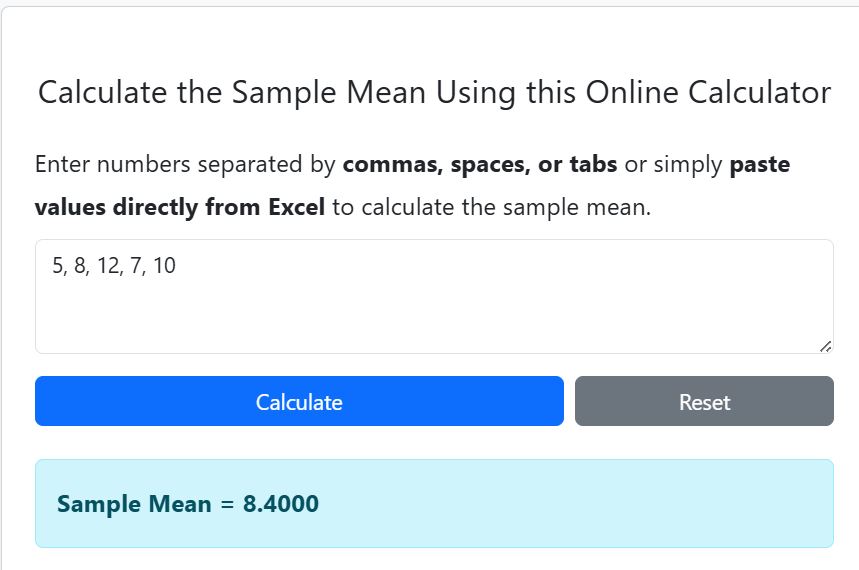
Finding the sample mean is easy. You can do it by hand or use our Sample Mean Calculator. Suppose you have the following sample data points from a population: 5, 8, 12, 7, 10
To find the sample mean of the data points, manually, follow these 3 steps:
- Step 1: Count the numbers: n = 5
- Step 2: Add the numbers: 5+8+12+7+10
- = 42
- Step 3: Divide the sum by the count: 42/5
- = 8.4
Thus, the sample mean is 8.4.
However, if you want a quick way to find the sample mean, you can use the calculator and follow these simple steps:
- Enter your numbers in the input box (Separate them with commas or spaces)
- Click Calculate button.
The calculator will give you the sample mean as 8.4 (See Figure 1) and show you exactly how it got the answer.
Want to go beyond the sample mean? Try our Descriptive Statistics Calculator to analyze your data more deeply. It provides more measures like median, mode, range, variance, standard deviation, and more.
Frequently Asked Questions
The sample mean is the average of a subset of data taken from a larger population. It helps summarize data and estimate the population mean when it’s not possible to measure every data point.
To calculate manually, add all the numbers in your sample, count the total number of values, and divide the sum by that count. This gives you the sample mean.
Yes! You can paste numbers directly from Excel into the calculator. Just make sure to separate the values using commas, spaces, or line breaks.
The sample mean is an estimate from a subset of data, while the population mean is the average of all data points in the entire population.