This calculator computes the range of any dataset and shows you how to calculate the range manually, step-by-step. Enter your data in the input field and click the calculate button to get instant results.
Range Calculator
DescriptiveEnter values separated by commas, spaces, or tabs (you can paste from Excel). Click Calculate to get the range with a step-by-step explanation.
How to Use the Range Calculator
Finding the range of a dataset with many decimal places can be challenging. However, this tool lets you find the range of any dataset quickly with a click of a button. Just follow these simple steps:
- Enter the dataset in the input field. The calculator accepts comma, space, or tab-separated values. You can also copy-paste values directly from Excel.
- Click the “Calculate” button
The calculator instantly returns the range, along with a step-by-step solution, showing you the maximum and minimum value in your dataset.
What is Range in Statistics?
In statistics, range is a measure of dispersion describing how the data is spread out. It is basically the difference between the maximum value and the minimum value in a set of observations.
While it does not provide detailed information about the distribution of the data, it’s often used as an initial measure of variability before applying advanced statistics such as standard deviation and variance.
Range Formula
The range formula is: Range = Maximum value – Minimum value
Where:
- The maximum value is the largest number in the dataset
- The minimum value is the smallest number in the dataset
- Range is the difference between the maximum and the minimum value.
How to Calculate the Range
Finding the range of a dataset is a straightforward process. Simply follow these steps:
- Arrange the data in ascending order
- Identify the minimum value in the dataset
- Identify the maximum value in the dataset
- Subtract the minimum value from the maximum value
Example. Calculate the range of the following data.
Data. 8, 3, 15, 10, 6
Solution
Step 1. Arrange the data in ascending order
The ordered data is 3, 6, 8, 10, 15
Step 2. Identify the minimum value
The minimum value from the ordered data is 3. That’s, minimum = 3
Step 3. Identify the maximum value
The maximum value from the ordered data is 15. Thus, maximum = 15
Step 4. Subtract the minimum value from the maximum value
The range formula is: Range = Maximum – Minimum
Thus, Range = 15-3
=12
Therefore, the range of 8, 3, 15, 10, and 6 is 12.
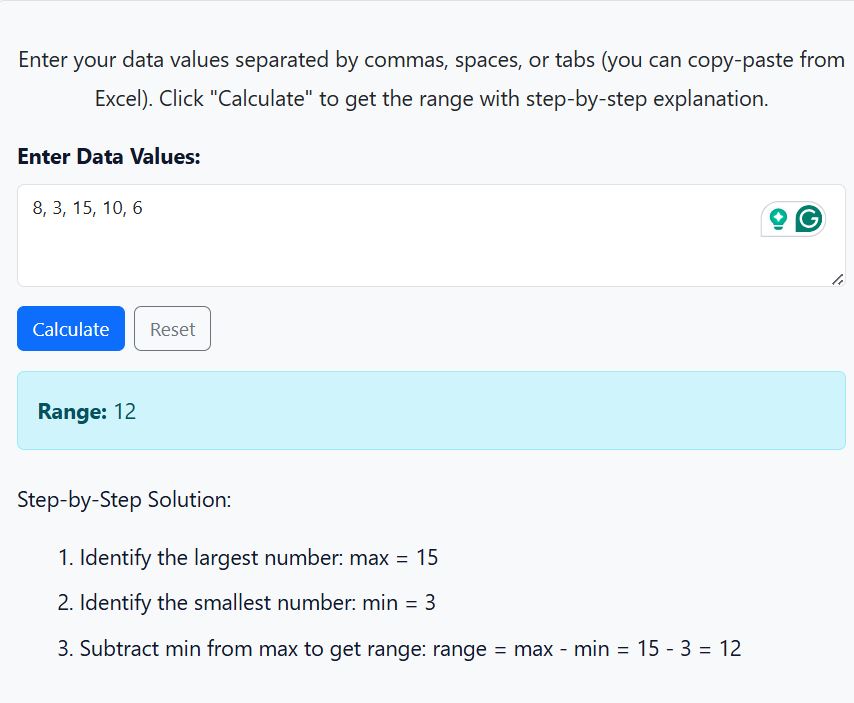
Want to confirm with the range calculator? Copy and paste the data into the tool and click the “Calculate” button. The calculator yields similar results, as shown below.
Applications of Range
Below are some of the fields where range is applied:
- In academia, it helps measure the difference between the highest and lowest grades in a class.
- In financial analysis, the range helps examine fluctuations between the highest and lowest stock prices over a given period.
- In quality control, it is used to evaluate variation in production measurements.