
Step-by-step solution
How to Use the Calculator
This calculator allows you to quickly find the population standard deviation from raw data. To use the calculator:
- Enter or paste your population data into the input box. You should separate the values using commas, spaces, tabs, or line breaks. Alternatively, you can also copy and paste a row or column of values directly from Excel, Google Sheets, or a text document.
- Click Calculate.
The calculator will instantly return the correct population standard deviation and other related statistics, including the population mean (μ), sum of squared deviations from the population mean, and population size (N). It also provides a clear, step-by-step solution, showing you how the population standard deviation was computed.
Working with sample data and want to compute the standard deviation? Use the sample standard deviation calculator instead.
Example
A small university research lab recorded the number of hours worked last week by all 7 research assistants in the lab:
10, 11, 17, 8, 9, 12, 5
Find the population standard deviation of the hours worked.
Solution
Since the data include all 7 research assistants in the lab, the values represent the entire population. To find the population standard deviation for this data using the calculator:
- Copy and paste the value into the calculator input field
- Click calculate
The calculator will instantly return: Population Standard Deviation, σ = 3.4523.
It also provides the following summary statistics, which you can key into the formula when calculating the population standard deviation by hand.
- Population mean, μ = 10.2857
- Sum of squared deviations, Σ(xᵢ − μ)² = 83.4286
- Population size, N = 7
Below the answer box, you’ll also see a step-by-step solution, showing you exactly how the value was obtained.
Want to understand the full manual process? See our complete guide on how to find population standard deviation by hand.
Formula Used by the Calculator
The calculator uses the following population standard deviation formula:
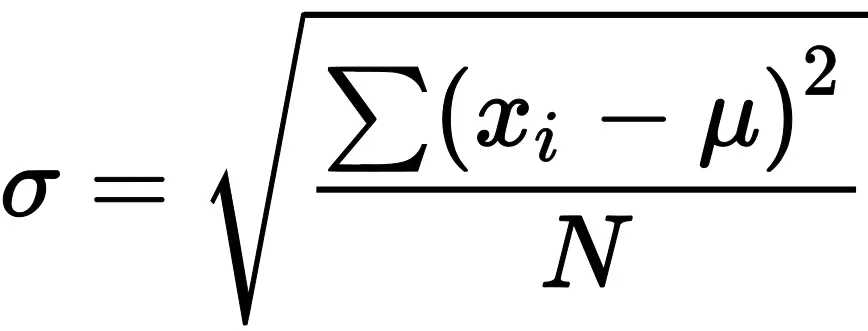
Where:
- σ = population standard deviation
- xᵢ = each value in the population
- μ = population mean
- N = population size
- Σ(xᵢ − μ)² = sum of squared deviations from the population mean
Therefore, once you enter the population data, the calculator automatically applies the above formula and returns the correct value, along with other essential statistics, including population mean, sum of squared deviations, and population size. These values can help you check the calculation or work through the formula yourself.
Understanding the Calculator Results
The main result is the population standard deviation, σ.
The calculator also gives:
- Population mean (μ): The average of all values in the population.
- Sum of squared deviations: The total of the squared differences between each value and the population mean.
- Population size (N): The total number of observations in the population.
Together, these related statistics give you the information needed to apply the population standard deviation formula.
Frequently Asked Questions
It is an online tool that finds the standard deviation of data that represent an entire population. To use the calculator, enter your values in the input field and click Calculate to get instant results, along with a clear, step-by-step explanation.
Yes. You can copy a row or column of numerical values from Excel or Google Sheets and paste them directly into the calculator.
You can separate the values using commas, spaces, tabs, or line breaks.
Use population standard deviation when your data include every observation in the population you want to describe. However, if your data include only part of a larger population, use the sample standard deviation calculator instead.
