This arithmetic mean calculator, also known as the average calculator, computes the average of a set of numbers instantly. Simply select the type of data you’re working with (population or sample), enter the values, and click calculate to get the arithmetic mean. The calculator also provides a step-by-step explanation section, showing you how the arithmetic mean of your data was calculated.
Free Arithmetic Mean Calculator
DescriptiveEnter numbers separated by commas, spaces, or tabs, or paste values directly from Excel to calculate the arithmetic mean. Choose sample or population to display the correct statistical notation.
How to Use the Arithmetic Mean Calculator
Want to calculate the arithmetic mean/average of population or sample data? This calculator provides instant results and a clear, step-by-step explanation. Here’s how it works:
- Select the data type you’re dealing with. Is it sample data or population data?
- Enter your data values into the input box. You can separate the numbers using commas, spaces, tabs, or line breaks. You can also paste values from Excel.
- Click the Calculate button
The calculator will instantly display the arithmetic mean of your data. You can also open the step-by-step explanation section to see how the average of your data was computed.
What is the Arithmetic Mean?
The arithmetic mean is the average of a set of numbers. In everyday language, it is simply known as the average. You can easily compute this value by simply adding all the values together and dividing the results by the total number of values in the dataset.
Because of its simplicity and usefulness, the arithmetic mean is the most popular measure of central tendency in statistics.
Arithmetic Mean Formula
The arithmetic mean is calculated by adding all values in a dataset and dividing the total by the number of values. The calculator uses the standard arithmetic mean formula:
Where:
- A = arithmetic mean
- Σa = sum of all values in the dataset
- n = number of values
This formula works the same way regardless of whether you’re working with sample data or population data. In other words, the formula is the same, with the only difference being the statistical notations. For instance, in statistics, the sample mean symbol is x̄, whereas the population mean symbol is μ.
You can also try our sample mean calculator and population mean calculator to learn more about how these statistical measures are related to the arithmetic mean.
How to Calculate the Arithmetic Mean
To calculate the arithmetic mean manually, follow these simple steps:
- Add all the values in your dataset to get the total sum.
- Count the number of values in the dataset.
- Divide the total sum by the number of values in the dataset.
The result is the arithmetic mean (average) of the dataset.
Example
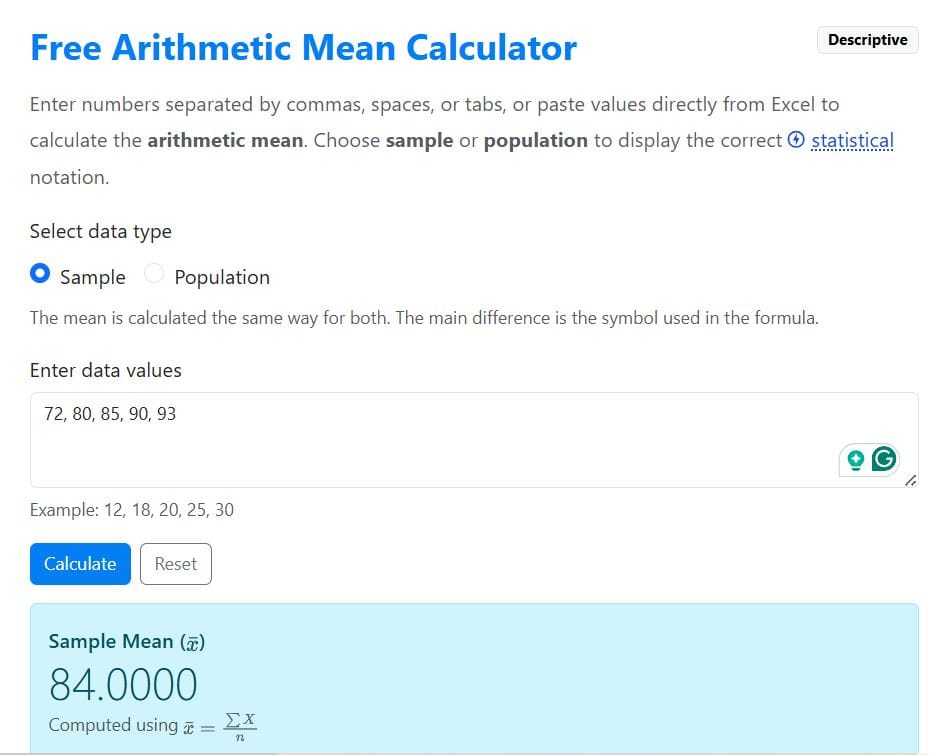
Suppose a teacher records the test scores of five students in a class. The results are: 72, 80, 85, 90, 93. Calculate the arithmetic mean of the test scores.
Solution
From the example, the test scores are only for five students in a class and not all students. Thus, this is sample data.
To find the arithmetic mean by hand, follow these steps:
Step 1: Add all the scores
72 + 80 + 85 + 90 + 93
= 420
Step 2: Count the number of scores
The test scores are for 5 students. Hence, the number of values in the dataset is 5.
Step 3: Divide the sum by the number of values
The arithmetic mean (average) = Sum of all values/total number of values
= 420/5
= 84.
Therefore, the arithmetic mean test score is 84.
Alternatively, you can quickly find the arithmetic mean of the test scores using our average calculator. Just copy and paste the values in the input field, specify you’re working with sample data, and click calculate. The calculator yields similar results, as shown below.
Limitations of the Arithmetic Mean
Although the arithmetic mean is widely used, it has a few limitations:
- Sensitive to outliers. Extremely large or small values can significantly affect the mean.
- May not represent skewed distributions well. In highly skewed datasets, the mean may not reflect the typical value.
- Not suitable for categorical data. The arithmetic mean only works with numerical data, not categories or labels.
Frequently Asked Questions
There is no difference. The arithmetic mean is simply the mathematical term for the average. It is calculated by dividing the sum of all values by the number of values.
Yes. You can calculate the arithmetic mean for both sample data and population data. The calculation method is the same, but statistical notation may differ.
The arithmetic mean can only be calculated using numerical (quantitative) data. If the data is categorical, you should use the median or mode to summarize the data.