
Step-by-step solution
How to Use the Population Mean Calculator
This calculator helps you find the population mean of all individuals under investigation by applying the correct formula, symbol, and notations. To use the calculator:
- Enter the population data in the input field. You can enter the values manually, separating them using commas, spaces, tabs, or line breaks. Alternatively, you can paste values directly from Excel, Google Sheets, or text documents.
- Click Calculate
The calculator will instantly apply the population mean formula, return the population mean, and show you how the value was obtained, step-by-step.
Population Mean Formula
This calculator uses the population mean formula: μ = ΣXᵢ /N
Where:
- μ is the mean of the entire group under study
- ΣXᵢ is the sum of all values in the target group
- N is the total number of values in the target group
How to Find the Population Mean Using the Calculator
Finding the population mean using this calculator is easy and quick. With the calculator, you only need to enter the dataset in the input field and click the calculate button.
Let’s consider an example to help you understand.
Example
Suppose a researcher records the monthly sales (in units) for a small store across five months. The values represent the entire population for the period being analyzed. The values are: 32, 35, 38, 40, 45. Find the mean of the population.
Solution
To find the mean using our calculator, follow these steps:
Step 1. Copy and paste the values into the calculator’s input field. You can also type them manually if you prefer that, but make sure to separate them using commas, spaces, or tabs.
Step 2. Click Calculate
The results will be as shown below.
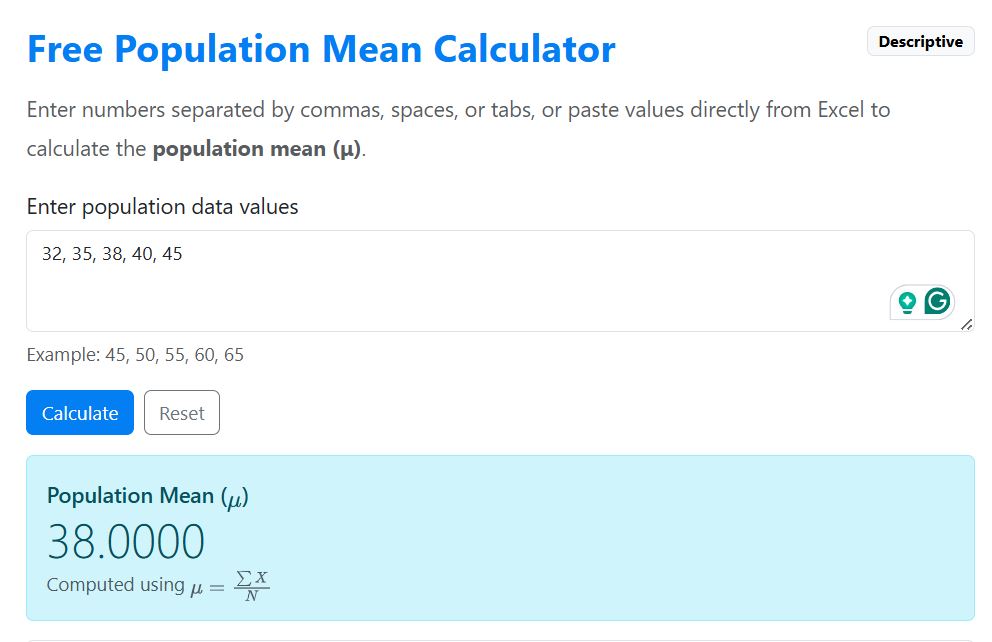
From the calculator’s output, the population mean is 38. This implies that the average monthly sale for the store is 38 units.
Want to learn the manual process? See our complete guide on how to find population mean by hand.
When to Use this Calculator?
Use the population mean calculator when your dataset includes every value in the group you are studying. For instance, you can use this tool when you’re calculating:
- Scores for every student in one class
- The ages of all employees in a small company
- Monthly sales for all months in a selected year
- Measurements from every product in a small batch
- All recorded values from a completed dataset
Population Mean vs Sample Mean
The population mean and the sample mean both measure the average value of a dataset. However, they are used in different situations. The population mean describes the average of all values in a population, while the sample mean estimates the average based on a subset (sample) of the population.
You should use the population mean when the data from the entire population is available. However, if collecting data from the whole population is impractical, you need to collect a subset of the data and compute the sample mean.
Frequently Asked Questions
It is a free online tool that finds the average of all values in the entire population you’re studying. The tool adds all values and divides the result by the total number of values in that population.
You can enter numbers separated by commas, spaces, tabs, or line breaks. You can also paste values directly from Excel, Google Sheets, or even text.
Use the population mean calculator when your data includes every value in the group. However, if your data includes only selected values from a larger group, use the sample mean calculator
This calculator is designed to show more than just the final answer. After you enter your data, it calculates the population mean and also shows the formula, the number of values, the sum of the values, and a step-by-step explanation. This makes it useful for students who want to understand how the answer was obtained, not just get the result.
