
Step-by-step solution
How to Use the Sample Mean Calculator
This calculator helps you find the mean of sample data and see how the value was computed. To use the calculator:
- Enter the data in the input field. You can either paste values directly from Excel, Google Sheets, or a text document. Alternatively, you can enter the values manually, but make sure to separate them using commas, spaces, tabs, or line breaks. It accepts comma-separated, space-separated, or even copy-paste from Excel.
- Click calculate
The calculator will instantly return the sample mean for your dataset and show you how the value was computed, step-by-step.
Sample Mean Formula
This calculator uses the sample mean formula: x̄ = Σxi / n
Where:
- x̄ is the sample mean
- Σxi is the sum of all values in the sample data
- n is the total number of observations in the sample data
As such, the calculator adds all the values in your dataset and divides by the total number of observations in your sample.
Example. Finding Sample Mean Using the Calculator
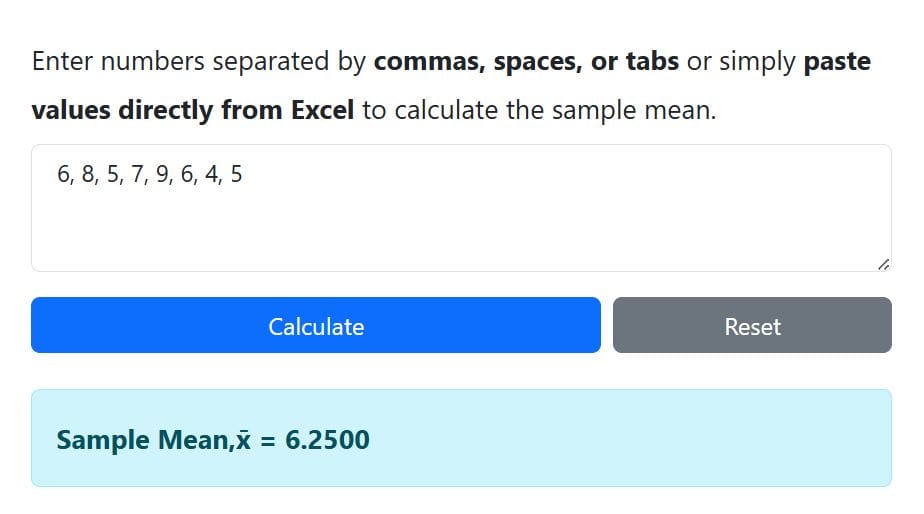
Suppose a lecturer records the number of hours 8 students studied before a statistics exam. The data is: 6, 8, 5, 7, 9, 6, 4, 5. Find the appropriate mean using the calculator.
Solution
Since the lecturer recorded only the number of hours for 8 students instead of all students in the class, we’re working with sample data. Thus, we need to find the sample mean of the dataset.
To find the sample mean using the calculator, follow these steps:
- Copy and paste the data into the input field
- Click Calculate
The calculator will instantly return the sample mean as 6.25, as shown below.
Want to learn how to compute sample mean manually? See the complete guide on how to compute sample mean by hand. You may also find our guide on finding the sample mean in Excel useful.
When to Use This Calculator?
Use this sample mean calculator when you want to quickly find the mean of sample data. It is especially useful when you have a list of values from a subset of a population and want to find the sample mean and see the steps.
You can use it when:
- You want to check your manual calculation
- You are working with sample observations
- You need the mean for homework or research
- You are summarizing numerical data
- You are preparing for a t-test, ANOVA, or other statistical analysis
- You want to paste data directly from Excel or Google Sheets
Population Mean vs Sample Mean
While the steps for calculating the sample mean and the population mean are the same, there’s a slight difference. The table below shows the key differences
| Sample Mean | Population Mean |
|---|---|
| The sample mean symbol is x-bar (x̄) | The population mean symbol is mu (μ) |
| The sample mean formula is x̄ = Σxi / n. | The population mean formula is μ = ΣX / N. |
| The sample mean is a variable value that changes from sample to sample (a statistic). | The population mean is a fixed, constant value (a parameter) for a given population. |
| The sample mean is used to estimate the unknown population mean. In this case, larger, random samples provide better estimates. | The population mean is often unknown and difficult or impossible to calculate for large populations. |
Frequently Asked Questions
This calculator finds the average of sample data. Specifically, it adds all the values you enter and divides the total by the number of observations.
Yes. You can paste data from Excel, Google Sheets, or another spreadsheet. The calculator accepts values separated by commas, spaces, tabs, or line breaks.
The calculator applies the usual sample mean formula: x̄ =Σxi /n. Where x̄ is the sample mean, Σxi is the sum of the values, and n is the number of observations.
This calculator is designed for the sample mean. Thus, if your data represent the entire population, use the population mean calculator instead.
Yes. The sample mean can be negative if the values in your dataset are mostly negative or if large negative values pull the average below zero.
