This calculator computes the harmonic mean of a set of data values. It is ideal for data expressed as rates, ratios, or speeds. Just enter the data in the input field and click “calculate” to get instant results. The calculator also provides a clear, step-by-step explanation, showing you exactly how to find the harmonic mean of your data.
Free Harmonic Mean Calculator
DescriptiveEnter numbers separated by commas, spaces, or tabs, or paste values directly from Excel to calculate the harmonic mean.
How to Use the Harmonic Mean Calculator
Finding the harmonic mean using this calculator is instant and accurate. Just follow these simple steps:
- Enter the data values separated by commas, spaces, tabs, or directly copy-paste from Excel.
- Click the “Calculate” button
The calculator will instantly return the correct harmonic mean for your data. Want to learn how to find the harmonic mean using your data? Just expand the step-by-step explanation section to see the complete steps.
Note. The harmonic mean of a set of numbers is undefined if any of the values are zero because its formula requires taking the reciprocal of each number. Since division by zero is mathematically undefined, it is impossible to calculate the harmonic mean if your data contains a zero.
What is the Harmonic Mean?
The harmonic mean is one of the different types of mean that computes the averages using the reciprocal of data values, rather than the values themselves. By finding the average of the reciprocal values, the harmonic mean gives more weight to smaller numbers in a dataset. This makes it ideal for averaging rates, ratios, or speeds.
Unlike the arithmetic mean, which simply adds values and divides by the total number, the harmonic mean is better suited for rates, ratios, and “per unit” data, where using a regular average could produce misleading results.
The Harmonic Mean Formula
The harmonic mean formula is
Where:
- HM is the harmonic mean
- n is the number of observations in the data
- xi represents each value in the dataset
- represents the sum of the reciprocals of all values in the dataset.
How to Calculate the Harmonic Mean (Step-by-Step)
To calculate the harmonic mean manually, follow these steps:
- Convert every data point into its reciprocal
- Add all the reciprocal values together
- Divide the total number of observations by the sum of all the reciprocal values
Example
A researcher records the speeds (in km/h) of a vehicle over equal distances as follows: 40, 50, 60, 80, 100. Calculate the harmonic mean speed.
Solution
To find the harmonic mean for the dataset by hand, follow these steps:
Step 1. Convert each value into its reciprocal
The reciprocals of the data values are:
1/40, 1/50, 1/60, 1/80, 1/100
Step 2. Add all the reciprocal values together
The sum of all the reciprocal values is:
= 0.025 + 0.020 + 0.0167 + 0.0125 + 0.010
= 0.0842
Step 3: Divide the total number of observations by the sum
The total number of observations is 5. Thus, n = 5
By definition, the harmonic mean formula is:
Therefore, HM = 5/0.0842
=59.3824
Thus, the harmonic mean speed is approximately 59.38 km/h.
We can also verify these results using the harmonic mean calculator. Just copy and paste the data values in the calculator and click calculate. The calculator will yield similar results as shown below.
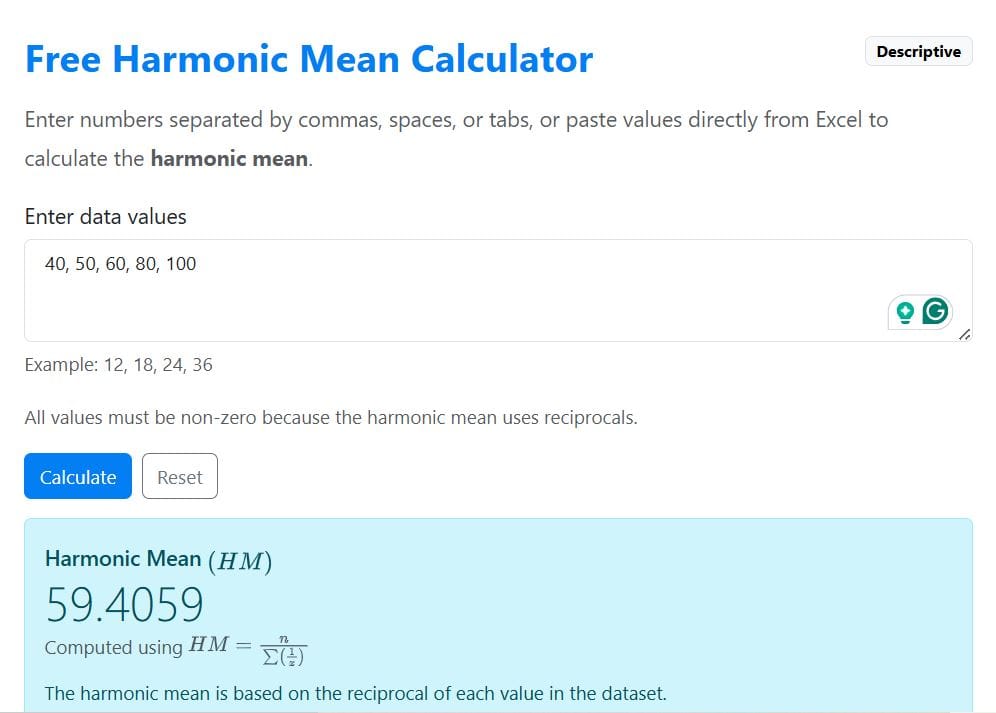
Note. The small deviation in means is because the calculator is more precise and accurate than manual computation.
When to Use the Harmonic Mean
The harmonic mean is most suitable when you’re working with:
- Rate data, such as speed
- Ratios and fractions data, especially those expressed as proportions
- “Per unit” data, such as cost per item data
Still confused on whether to use the harmonic mean or the arithmetic mean? The harmonic mean is most appropriate when you want smaller values to have a greater influence on the average.
Limitations of the Harmonic Mean
The harmonic mean is associated with various limitations. Some of them are:
- It cannot handle zero values since division by zero is undefined.
- It is highly sensitive to small numbers, which can distort results
- It is not suitable for general datasets where values are not rates or ratios
- It is less intuitive and harder to interpret than the arithmetic mean