This calculator computes the weighted mean from a set of values and their corresponding weights. Simply enter the values and the weights to get instant results with a clear, step-by-step explanation of how the weighted mean was calculated.
Free Weighted Average Calculator
DescriptiveEnter the values and their corresponding weights to calculate the weighted mean. Separate numbers with commas, spaces, tabs, or paste directly from Excel.
How to Use the Weighted Mean Calculator
Struggling to find the weighted mean for your dataset or need to confirm the accuracy of your results? Using the weight mean calculator is very simple. Just follow these steps:
- Enter the values in the first input box. Separate numbers using commas, spaces, or tabs, or paste them directly from Excel.
- Enter the corresponding weights in the second input box. Make sure to separate them using commas, spaces, or tabs. Also, each value must have a matching weight.
- Click the “Calculate” button
The calculator will instantly return the weighted mean. You can also expand the step-by-step explanation section to see how the weighted mean was computed for your dataset.
Note. The number of values must equal the number of weights. Otherwise, the results will be wrong.
What is a Weighted Mean?
A weighted mean is an average that assigns different levels of importance to values in a dataset, rather than treating all the observations equally.
Unlike the arithmetic mean, where all values contribute equally, a weighted mean gives greater influence to values with larger weights. This helps produce a more accurate average, particularly when some observations matter more than others.
Researchers and analysts use the weighted mean in many situations. For example, teachers use it to calculate final grades when exams, assignments, and quizzes have different percentage contributions to the final grade. Economists use it to compute index numbers. Survey researchers apply it when calculating weighted survey scores.
Weighted Mean Formula
The weighted mean formula is x̄w = Σwx/Σw
Where:
- x̄w = weighted mean
- w = weight assigned to a value
- x = data value
- Σwx = sum of the weighted values (each value multiplied by its weight)
- Σw = sum of all weights
Therefore, to calculate the weighted mean, multiply each value by its weight, add the results together, and then divide these results by the sum of all weights.
How to Calculate the Weighted Mean
Finding the weighted mean manually is straightforward when you understand the steps. Just follow these simple steps:
- Multiply each value by its weight to obtain the weighted value.
- Add all weighted values together to get the total weighted sum.
- Add all the weights together to obtain the total weight.
- Divide the total weighted values by the total weight to obtain the weighted mean.
Example
A lecturer calculates a student’s final score using a weighted grading system. The course includes four components, and each contributes a different percentage to the final grade.
The summary of the final score is shown in the table below.
| Component | Score (x) | Weight (%) (w) |
|---|---|---|
| Assignments | 72 | 20 |
| Quizzes | 78 | 15 |
| Midterm Exam | 85 | 25 |
| Final Exam | 90 | 40 |
Use the data to calculate the weighted mean score for the student.
Solution
To find the weighted average for the student by hand, follow these steps:
Step 1. Multiply each value by its weight
- 72×20 = 1440
- 78×15 = 1170
- 85×25 = 2125
- 90×40 = 3600
Step 2. Add all weighted values
The sum of all weighted values is given by:
Σwx = 1440+1170+2125+3600
=8335
Step 3. Add all the weights
The sum of all the weights is Σw = 20+15+25+40
=100
Step 4. Divide the total weighted values by the total weight
By definition, the weighted average formula is x̄w = Σwx/Σw
Substituting the values in the formula gives:
Weighted mean, x̄w =8335/100
= 83.35
Therefore, the student’s weighted mean score is 83.35.
Alternatively, you can quickly find the weighted mean for this dataset using our free calculator. Just follow these steps:
- Step 1. Enter the scores (X) in the first input field
- Step 2. Enter the weights in the second input field
- Step 3. Click Calculate
The calculator yields similar results, as shown below.
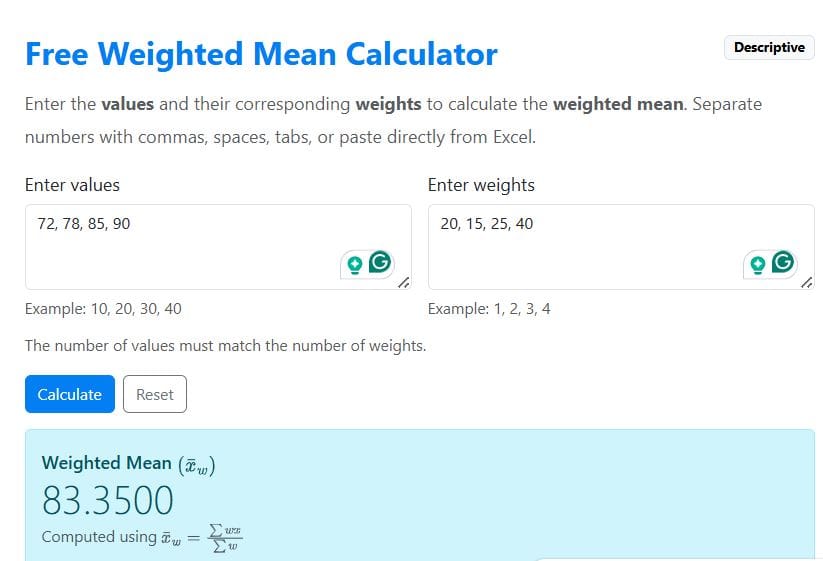
You can also see the manual computation steps by expanding the step-by-step explanation section.
When to Use a Weighted Mean
In many real-world situations, not all values contribute equally to the final average. Some observations carry more importance than others. In such cases, you cannot find the average using the arithmetic mean, as this would lead to inaccurate results. Instead, you should account for these weights by applying the weighted mean formula.
Still struggling to determine whether you need to use the weighted mean or the arithmetic mean? The following are examples of when to use the weighted average:
- When some observations are more important than others
- When you want to find the mean of categories with different contributions.
- When you wish to find the final grades of a student based on assignments, quizzes, and exams with different weights.
- When you want to find the mean of grouped data, such as frequency distributions.
- When working with index numbers or survey scores, where weights represent the influence of different groups or variables.
Limitations of the Weighted Mean
While the weighted mean is useful in handling datasets with weighted values, it is associated with various limitations. Common limitations include:
- Results depend heavily on the assigned weights. As such, if the weights are incorrect, the final average will also be misleading.
- Poorly chosen weights can distort the average
- It is not appropriate when all observations should contribute equally.
- The results can be misunderstood, especially if there is no clear explanation of the weights.
Frequently Asked Questions
An arithmetic mean treats all values equally when calculating the average. However, a weighted mean assigns different levels of importance to values, where values with larger weights have a greater influence on the final result.
Yes. Weights are often expressed as percentages, especially when calculating final grades or performance scores. These percentages should add up to 100%. You can choose to convert percentages to proportions before calculating the weighted mean, and the results will be the same.
If you are dealing with data with equal weight, then the weighted mean is not appropriate. Use the arithmetic mean instead.
When calculating the weighted mean, always make sure that each value has a corresponding weight. If one or more wight is missing, it becomes impossible to find the weighted average.
Yes. A value with a very large weight can strongly influence the final average. This is why it is important to assign weights carefully so that they accurately represent the importance of each observation.