
Step-by-step solution
How to Use the Sample Standard Deviation Calculator
This calculator is appropriate when you want to find standard deviation from sample data. To use the calculator:
- Enter or paste your sample data into the input box. Separate the values using commas, spaces, tabs, or line breaks. You can also copy and paste a row or column of values directly from Excel, Google Sheets, or a text document.
- Click Calculate.
The calculator will return the sample standard deviation, related statistics, and a clear, step-by-step solution explaining how the answer was obtained.
Want to find standard deviation for the entire group under investigation? Use the population standard deviation calculator instead.
Example
A researcher selects 5 students from a larger group and records the number of hours they studied during a particular week:
5, 10, 15, 20, 9
Find the sample standard deviation of the study hours.
Solution
Since the 5 students are only part of the larger group, the observations represent a sample. To find the required sample SD using the calculator:
- Enter or paste the values into the calculator
- Click Calculate.
The calculator instantly returns: Sample Standard Deviation, s = 5.8052
It also provides the following related statistics:
- Sample mean, x̄ = 11.8
- Sum of squared deviations, Σ(xᵢ − x̄)² = 134.8
- Sample size, n = 5
These are the values needed in the sample standard deviation formula.
Below the answer, you will also see a step-by-step solution showing how the calculator arrived at the result.
Want to learn how to find the sample standard deviation manually? See the complete guide on how to find sample standard deviation.
Formula Used by the Calculator
The calculator uses the sample standard deviation formula:
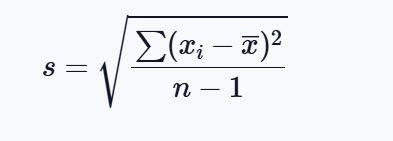
Where:
- s = sample standard deviation
- xᵢ = each value in the sample
- x̄ = sample mean
- n = sample size
- Σ(xᵢ − x̄)² = sum of squared deviations from the sample mean
The calculator applies this formula automatically to the values you enter and instantly returns the correct sample standard deviation. It also provides you with related statistics such as the sample mean, sum of squared deviations, and sample size, which you can plug into the formula manually to confirm the result.
Why Does the Sample Standard Deviation Formula Use n − 1?
You may notice that the sample standard deviation formula divides by n − 1 rather than n.
This is because sample data are usually used to estimate the variability of a larger population. Using n − 1 helps correct the tendency of a sample to underestimate the population variability. This adjustment is commonly known as Bessel’s correction.
You do not need to make this adjustment yourself when using the calculator. The tool automatically uses n − 1 when calculating the sample standard deviation.
When Should You Use the Sample Standard Deviation Calculator?
Use this calculator when your data contain only some of the observations from a larger population.
For example, you may have:
- Test scores from selected students in a university
- Heights from a sample of adults
- Measurements from selected products in a production process
- Survey responses from a sample of customers
- Measurements from participants selected for a research study
Want to quickly find population or sample standard deviation in one place? Use the standard deviation calculator.
Frequently Asked Questions
This is an online tool that finds the standard deviation of sample data. Enter your observations, and the calculator returns the sample standard deviation, related statistics, and a step-by-step solution.
Yes. You can copy a row or column of numerical values from Excel or Google Sheets and paste them directly into the calculator.
You need at least 2 observations to calculate a sample standard deviation because the formula uses n − 1 in the denominator.
The sample standard deviation formula uses n − 1 because the sample is being used to estimate variability in a larger population. The calculator applies this automatically.
